
If you want to track the success of your cold email campaigns, it helps to know which performance metrics you should be measuring.
In this guide, we will break down exactly which key metrics you need to worry about. We’ll show you how to calculate them, whether they matter or not, and how to improve the cold email metrics that affect the success of your email outreach campaigns.
Here’s a quick view of the benchmarks for the most commonly tracked cold email metrics after analyzing millions of emails sent with QuickMail.
| Cold Email Metric | Benchmark For Success |
|---|---|
| Open Rate | 60%+ |
| Reply Rate | 20%+ |
| Bounce Rate | <3% |
| Unsubscribe Rate | <10% |
We’re not stopping there. In this guide we’ll cover these and more metrics in depth:
- Open Rate
- Reply Rate
- Adjusted Reply Rate
- Positive Reply Rate
- Bounce Rate
- Click-Through Rate (CTR)
- Spam Complaint Rate
- Overall Campaign ROI
- Unsubscribe Rate
- Avoiding Cold Email Vanity Metrics
- Tracking Your Key Cold Email Metrics with QuickMail
Sounds good? Let’s dive in.
1. Open Rate
What Is Open Rate?
Your open rate is the best indicator of whether your sales emails are getting opened by potential customers or inboxed at all. If they aren’t, and they just get sent straight to spam, then all your writing efforts go out the window.
Open rate is a crucial metric you should pay close attention to so you can make sure you’re actually getting in front of your reader’s eyes.
Does Open Rate Matter?
Yes, it matters. But it’s not a bulletproof metric. Why?
Well, open rate works by adding an invisible pixel (a 1px by 1px image) to your emails. Then, when your recipient opens your email, the image will load, and the server you’re using to track your open rate will know who opened your email and when.
The problem with that is that it lowers your chances of landing in the primary inbox of your cold prospects because email providers like G Suite know that the pixel is there (even if your prospect doesn’t).
Prospects can also disable automatic image loading in their email settings, and many people choose to. If your prospect’s email client doesn’t automatically load images, they can open your email, and you’ll never know.
There are also chances of false positives because spam filters load your emails as they scan the content. So, even if your prospect never opens the email, your open tracking might indicate they did, giving you false information.
As well as that, some prospects will open every email that lands in their inbox. It won’t necessarily be a reflection of the email subject line and won’t guarantee a reply.
What is a Good Open Rate?
We looked at the data from over 15 million emails sent using QuickMail. In there, we found that an open rate above 60% is a great benchmark. If you can consistently hit that level, you can be confident that your prospects are qualified and your subject lines are compelling.
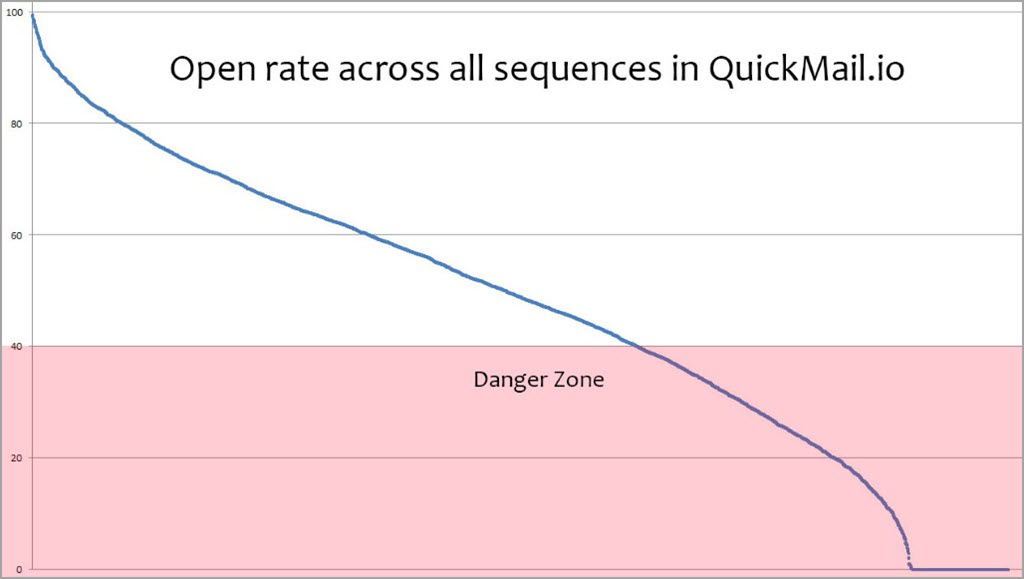
An open rate of 40% or less starts to put you in danger of a bad sender reputation, as ESPs will start to believe your emails don’t have value for your cold email recipients.
It’s a vicious cycle from there, as more of your emails will be sent directly to spam, and your open rate and average response rate will drop off even more. If you see your open rate lowering, slow down on your cold email outreach and audit your campaigns for problems and improvements.
How to Improve Your Open Rate
- Run A/B tests to identify which time frames – time and day – work best for sending initial emails.
- Use actionable subject lines that entice curiosity. Experiment with numbers, sentence length, and questions.
- Use the preview text effectively and use personalization in your cold email opening line to make prospects curious enough to open your email.
[cta title=“Get better results from your cold outreach” text=“Teams book more meetings and get more replies with QuickMail” button=“Try our platform for free” url=“https://next.quickmail.com/signup”\]
What Is Reply Rate?
Reply rate is the number of your total sent emails that get a reply.
For example, if you sent 1,000 emails and got 200 replies, that’s a 20% reply rate.
When it comes to cold email, cold email reply rate is far more important than typical email marketing metrics like open rate or click-through rate. Your goal is to start conversations, and a high reply rate indicates that your cold emails are achieving their main purpose.
What Reply Rate Should You Expect?
Reply rate incorporates every email you send and both positive and negative replies.
Because of that, it’s not a completely reliable metric.
However, when we looked at the data in QuickMail, we found that the best 25% of campaigns have a 20% reply rate or more.
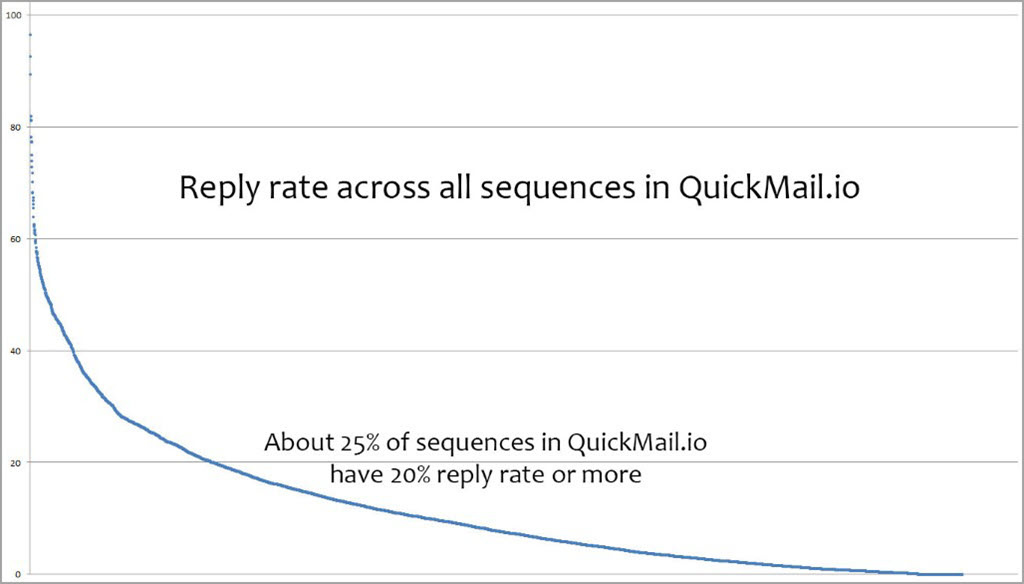
It’s an indicator that your call-to-action is good and your list of prospects is qualified for your outreach.
How to Improve Your Reply Rate
- Test different cold email call-to-actions: ask a quick question, ask if they want to get a coffee, or whatever makes the most sense for your prospects
- Ask a simple question that’s easy to reply to
- Don’t ask recipients to click on a link
- Improve your email list quality to ensure your offer resonates with your prospects
3. Adjusted Reply Rate
What Is Adjusted Reply Rate?
Adjusted Reply Rate tells you the number of replies your cold outreach campaign received based on the number of people who opened your email.
It gives you a better indicator of how an email performs than the reply rate alone, as if someone didn’t open your email, it’s not a reflection of your email content.
For example, if 100 people open your email and ten people reply (10% adjusted reply rate), it’s a very different story than if 20 people open it and ten people reply (50% adjusted reply rate) — even if both campaigns generated ten replies.
The adjusted reply rate is particularly useful when A/B testing two email variations because it gives you a direct comparison.
What’s a Good Adjusted Reply Rate?
Your adjusted reply rate is one of the best indicators of how compelling your email is.
If you provide value to your prospect, and show you’ve done your research, you’ll be more likely to get a reply from everyone who opens your email (even if it’s to let you know they’re not currently interested in what you’re offering).
How to Improve Adjusted Reply Rate
A/B test two different emails
Compare the adjusted reply rate to see which one performs better
- Run A/B tests to find your best-performing email copy and call-to-actions
- Avoid open and click tracking so all of your emails get inboxed
- Verify that your email list will care about your email’s content
4. Positive Reply Rate
What Is Positive Reply Rate?
Positive reply rate is the ratio between positive replies and negative replies to your cold email campaign.
If you track your positive reply rate, you’ll have a clearer picture of how successful your outreach strategy is.
For accuracy, ensure you only account for replies from emails that were opened and replied to. If you’re counting emails that weren’t even opened in the first place, it will make your positive reply rate look lower than it truly is and might cause you to make changes to a campaign that’s performing well.
Tools like QuickMail make this simple to track by using AI for granular reply sentiment detection.
What’s a Good Positive Reply Rate?
A positive reply rate of 50% or above is what you need to aim for.
Anything less, and there’s a good chance that either your prospect list isn’t a good fit for what you’re selling or your value proposition and cold email template isn’t compelling.
Depending on what you’re selling, you can still see a huge ROI from cold email even if you’re getting a 30-50% negative cold email response rate.
How to Improve Your Positive Reply Rate
- Invest more time in building a qualified prospect list
- Test different call-to-actions that make it easier for prospects to reply
- Incorporate social proof into your email copy to build trust
- Make sure to follow up 3-6 times in your campaign
5. Bounce Rate
What is Bounce Rate?
Col email bounce rate tells you how many of your total sent emails aren’t reaching your prospect’s inbox.
Calculate it by dividing the number of bounced emails by your total number of emails sent.
It’s an important metric to track because if your bounce rate is too high, ESPs like Gmail will think you’re a spammer, resulting in a downward spiral of more of your emails being sent to spam or struggling to make the inbox.
What’s a Good Bounce Rate?
A good bounce rate is anything under 3-5%. If your bounce rate is higher than 5% it’s a sign that your email list hasn’t been verified. It’s also going to increase the chance that email service providers like Gmail and Outlook
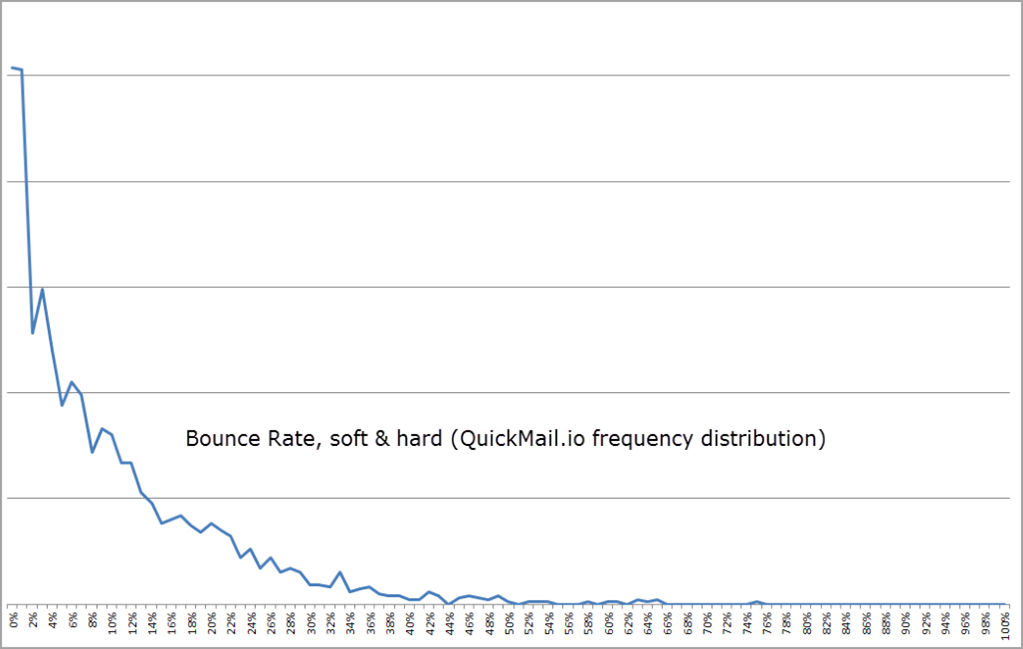
As you can see, the majority of cold email campaigns will have a small percentage of emails that bounce. Email verification tools aren’t foolproof.
How to Reduce Your Bounce Rate
- Use a tool like BriteVerify, Dropcontact, NeverBounce to verify emails before sending
- Clean, test, and segment your email lists frequently.
- Choose a reliable Email Service Provider (ESP) like Outlook or G Suite that email servers trust.
- Provide value to recipients to reduce the chances of being reported for spam
[cta title=“Better results come from better cold outreach” text=“Your team can start winning at scale in QuickMail” button=“I want a better platform” url=“https://next.quickmail.com/signup”\]
6. Click-Through Rate (CTR)
What is Click-Through Rate?
Click-through rate (also called Click Rate, or CTR for short) is the number of people who click on a link inside your emails.
Before we go any further, it’s important to know that if you’re sending cold email campaigns, CTR is a vanity metric. Your goal isn’t to get clicks; it’s to start conversations.
If you optimize for clicks, you’ll end up resorting to tactics like adding extra links to an email, giving you a higher chance of being flagged for spam. It’s also unnatural: you wouldn’t track links in an email you sent to colleagues or people you’ve met before.
On the other hand, tracking your clicks is normal and acceptable if you send regular email marketing campaigns to your email subscriber list for product promotions or a regular newsletter.
How to Measure Your Click-Through Rate
To track your click-through rate you’ll need to enable click tracking. Unfortunately, this gives you fewer chances of landing in the inbox.
Most cold email outreach tools track clicks by adding a unique tracking URL to each link, which ESPs can see. If you include a tracking link, it’s evident that you’re reaching out for sales and marketing purposes rather than sending a genuine email to someone.
How to Improve Your Click-Through Rate
- If you’re running email marketing campaigns (not cold email campaigns), test different button colors and call-to-action text, and experiment with your offers.
- If you’re sending cold email campaigns, don’t spend your time optimizing for clicks: your goal is to start a conversation, not get your prospect to click a link.
7. Spam Complaint Rate
What Is Your Spam Complaint Rate?
The spam complaint rate refers to the number of people who will report your cold emails as spam when they receive them. It doesn’t include any emails that are delivered directly to the spam folder.
If you send 500 cold emails and five people mark it as spam, that’s a 1% spam complaint rate.
If your spam complaint rate is high, it’s a clear indicator that there’s a problem with your outreach. For example, you might be coming across as a spammer or have a product/service that isn’t relevant to your recipients.
If you don’t fix your spam complaint rate, your sender reputation will be hurt, and your future email campaigns will struggle to make it to your prospects’ inboxes.
What’s an Acceptable Spam Complaint Rate?
Of course, the lower your spam complaint rate, the better. That said, 0.1% is a reasonable complaint rate. If it’s any higher than that, it’s a potential red flag.
Gmail’s regulations for bulk senders released in February 2024 require a spam complaint rate below 0.3%. We recommend aiming for compliance with this benchmark no matter what volume of emails you send.
If your spam complaint rate is too high, you need to review your prospect list, email copy, and call-to-actions to ensure they’re not making you look untrustworthy.
Because a high spam complaint rate can seriously hurt your email deliverability in the long run, it’s always worth sending cold emails from a cold email domain separate from your main company email address. That way, badly timed cold emailing campaigns won’t affect your email activity with existing clients and team members.
You can’t easily measure your spam complaint rate as your prospects won’t tell you, but there are steps you can take to make sure it stays low.
How to Reduce Your Spam Complaint Rate
- Never purchase an email list
- Personalize every email with unique attributes like first name, or a custom opening line for every prospect
- Don’t ask people to click on links
- Don’t follow up multiple times in a short span (e.g., 3 follow ups in 3 days)
- State who you are in your email signature
8. Overall Campaign ROI
What Is Overall ROI?
Your overall ROI is the return on investment you generated from your cold email campaign.
The good thing about cold email is that the fixed costs are relatively low. All you need is a cold email marketing tool to automate your outreach and time to build a prospect list to get started.
At the end of the day, your ROI is the most important cold email metric to track. If your ROI is positive, it’s worth continuing. If not, you might have more success with other acquisition channels.
Tools like QuickMail make it easy to keep track of what campaigns are adding to your pipeline with won/lost attribution for each lead.
How to Measure Your ROI
To calculate the ROI on your cold email campaign, divide your total profits by your total costs, and multiply the result by 100.
When calculating your ROI, make sure to account for all of the costs involved, such as:
- Subscriptions to cold email tools like QuickMail
- The time it took for you or a team member to build your prospect list
How to Improve Your Cold Outreach ROI
- Ensure your prospect list is well-qualified for your product/service.
- Design your call-to-action to start conversations with prospects.
- Focus on improving your email deliverability: the more emails that land in the inbox, the more chances of a reply and the more chances of closing a new deal.
- Always follow up multiple times before giving up (use an automated cold email tool like QuickMail to do this automatically).
9. Unsubscribe Rate
What Is Unsubscribe Rate?
The unsubscribe rate tells you the percentage of your email recipients who unsubscribed from your email, either through clicking on an unsubscribe link or replying asking you to stop emailing them.
Every cold email campaign you send will have people unsubscribing or asking you to stop. It’s normal to have a number of negative replies.
However, if you’re seeing a large portion of recipients asking you to unsubscribe them, there’s a problem.
This metric can feel murky in tools without attribution. QuickMail prompts prospects to give feedback when they unsubscribe so you get campaign-level insights you can act on.
What’s an Acceptable Unsubscribe Rate?
Your unsubscribe rate should be 10% or lower. It’s important to note that this would be a very high unsubscribe rate if you were sending traditional email marketing campaigns to opted-in subscribers — in that case, you’d need to aim for around 3% or lower.
Most campaigns will get more negative replies than that, but they won’t be people explicitly asking you to stop emailing them. Instead, they might ask you to check back in six months or let you know it’s not the right time, both of which are different from someone telling you to unsubscribe them from your campaign.
How to Reduce Your Unsubscribe Rate
- Never use misleading or clickbait subject lines.
- Personalize every email to show you’ve researched your prospect
- Cut out the fluff from your email templates
- Stop your follow-ups after around six emails to avoid annoying people who aren’t going to reply
Avoiding Cold Email Vanity Metrics
In traditional email marketing, you’d look at metrics like open and click-through rates as key success indicators.
But when it comes to cold email, you need to do everything you can to avoid focusing on vanity metrics.
For example, if you sent 100 emails and got 100 opens but got no replies, the campaign was a failure.
On the other hand, sending 100 emails, getting 50 opens, and receiving 25 positive replies from qualified prospects would be a success: even though it had fewer total opens.
Your ultimate goal when sending a cold email is to start a conversation with a prospect. Even if the reply isn’t positive at first, if someone is willing to engage with you, there’s a good chance they may want to work with you in the future.
[cta title=“You deserve better results from your cold outreach” text=“QuickMail makes it simple to run high-performing outreach at scale” button=“Start my trial” url=“https://next.quickmail.com/signup”\]
Tracking Your Key Cold Email Metrics with QuickMail
QuickMail makes it easy for you to track the performance of your cold email campaigns.
Once you launch a campaign, you’ll see a detailed breakdown of your results.
You can see results based on overall performance or adjusted performance, showing results compared to the number of emails opened by your prospects.
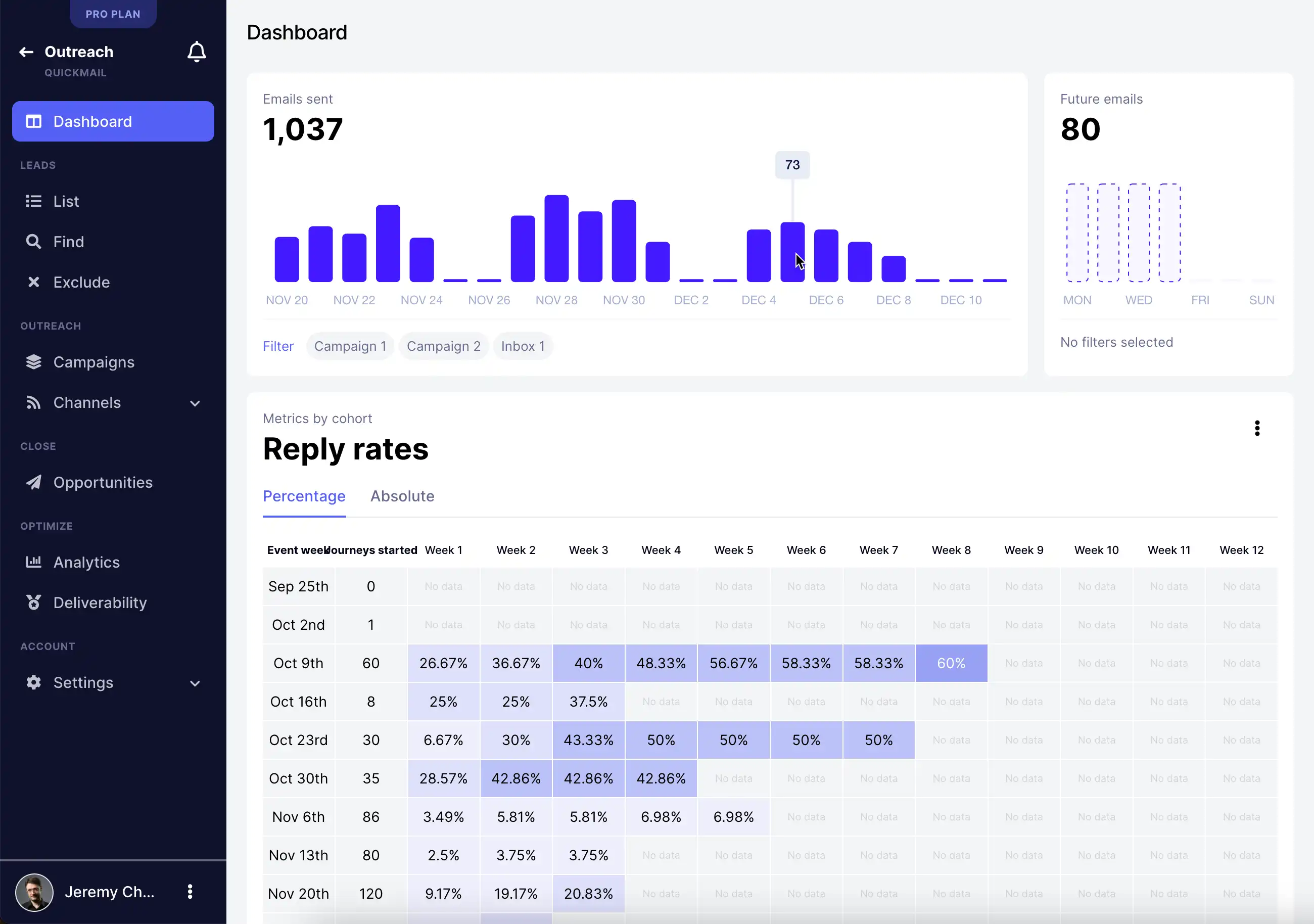
By reviewing metrics on an email-by-email basis you understand which touchpoints in your campaign are performing best or not generating the results you expected.
You can also see your cold email metrics broken down with send-day attribution in advanced analytics. This ties each action taken by a prospect (like an open, click, or reply) back to the time the email was sent to them for better visibility and optimization.
Over time, you can optimize your campaigns to make sure they’re as engaging as possible for your prospects, allowing you to start more conversations and win more new business.
Wrapping Up
These cold email marketing metrics will help you analyze how well your outreach is performing and make smarter decisions when creating new campaigns.
The key is to focus on metrics that link directly to your bottom line, such as positive reply rate, campaign ROI, and adjusted reply rate.
Even though the numbers won’t look as good as vanity metrics like open rate, they’ll have a bigger impact on your business and revenue in the long run.
When you’re ready to launch your cold email campaigns and start more conversations with qualified prospects, sign up for your free trial of QuickMail.