
Cold email is an incredible channel for recruiters to leverage.
You can use it for every part of your role: getting in touch with high-quality candidates, and reaching out to new potential clients.
In this article, you’ll learn why you need to be using cold email, how to write a cold email for recruitment purposes, and the steps you need to take to implement your cold email strategy.
- Why Use Cold Email for Recruitment Outreach?
- Cold Email for Recruitment vs. LinkedIn Outreach
- How Do You Write a Cold Email for Recruitment Outreach?
- How to Run a Recruitment Cold Email Process
Let’s dive in.
Why Use Cold Email for Recruitment Outreach?
1. Contact High-Quality Passive Candidates
Cold email is a powerful channel for candidate outreach.
For example, suppose you’ve identified a passive candidate who is a perfect fit for a role you’re hiring for. You can use cold email to send the potential candidate a friendly message, introducing yourself and the role, then showing why it’s worth their time.
If the opportunity is relevant, most candidates will be happy to reply.
2. Get in Touch with New Potential Clients
Cold email software like QuickMail allows you to reach out to key decision-makers at companies that you think would make an ideal client.
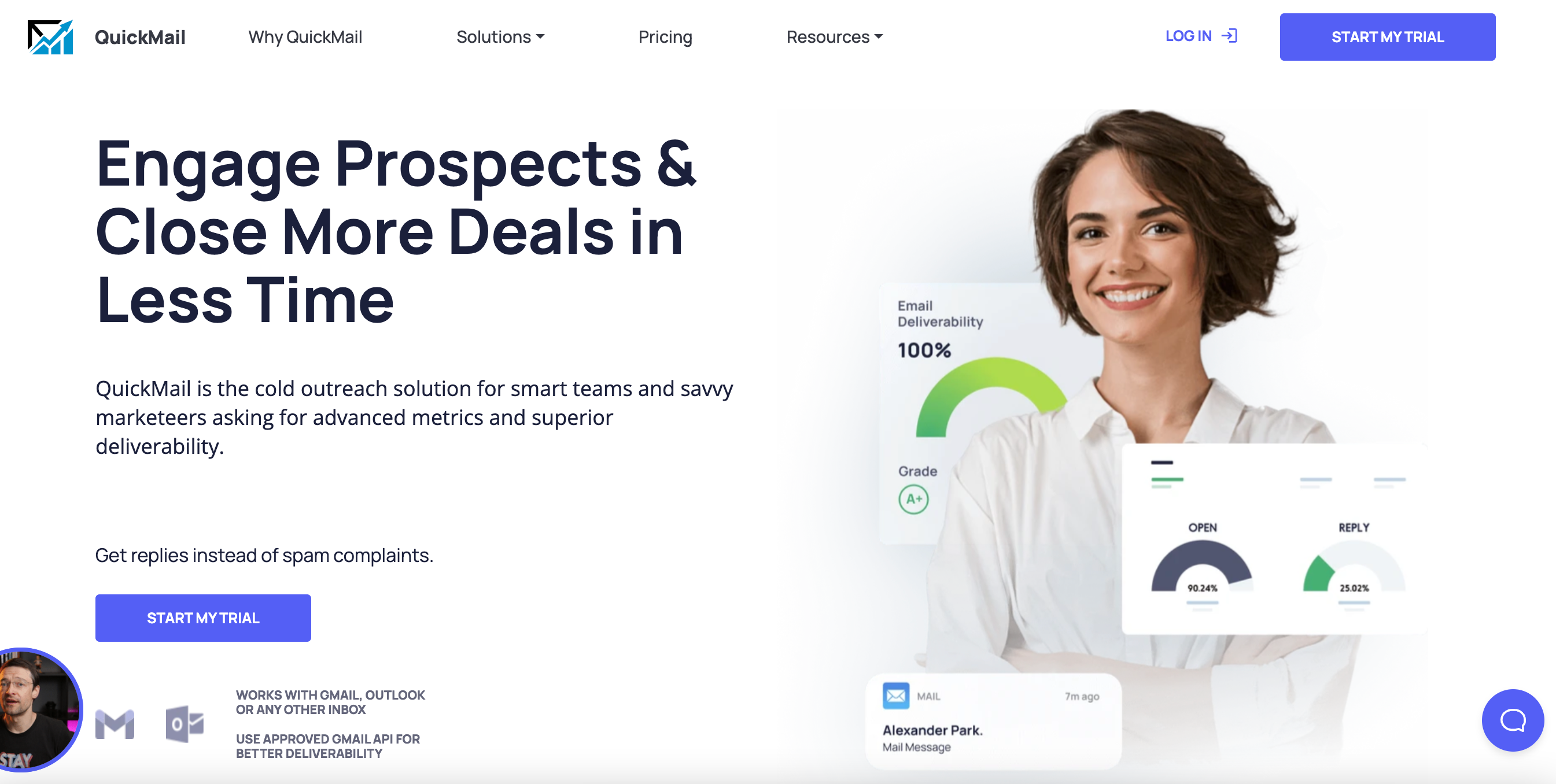
You don’t need to wait for people to arrive on your LinkedIn page or company website to generate new client leads. Instead, you can proactively approach them, explain the benefits of working with you, and close new deals.
3. Diversify Your Outreach Channel Mix
Many recruiters only rely on Linkedin outreach to generate new candidate and client leads.
LinkedIn is an excellent channel, but there’s still a large number of people who don’t use the platform daily. If they miss your InMail, you’ll lose them from your process.
Cold email gives you a new way to contact clients and candidates. If someone doesn’t reply on LinkedIn, you can send a friendly email to their inbox and start a conversation.
Cold Email for Recruitment vs. LinkedIn Outreach
Many recruiters rely on LinkedIn as their primary channel for networking with clients and candidates.
Cold email isn’t competing with LinkedIn. It’s a different type of channel.
For example, LinkedIn prospecting is an excellent way to identify qualified people to reach out to. But, not everyone will check their LinkedIn inbox, so you may see a lower reply rate on the channel compared to email, particularly if you’re contacting C-Suite decision-makers or hiring managers.
The best way to look at cold email is as an additional channel that you can add to your process.
Track your results and see how it compares to your existing process, and if you see an improvement, you can double down.
Find more tactics and templates in our ultimate playbook for recruiter outreach automation.
How Do You Write a Cold Email for Recruitment Outreach?
1. Pick a Simple Subject Line
The first part of any cold recruiting email is the subject line.
Keep this as simple as possible and avoid subject lines that look like they could come from an email marketing campaign.
Here are some example recruitment email subject lines you can use as inspiration.
Subject lines for candidate outreach:
- Open role at {{company.name}}
- Interested in this opportunity?
- Intro to {{company.name}}’s open role
Subject lines for client outreach:
- Reducing {{company.name}}’s time to hire
- Hiring a [open position] for {{company.name}}
- Help with hiring at {{company.name}}
As you can see, all of these subject lines have a few factors in common: they’re personal, simple, and transparent.
Before your recipient even opens your email, they’ll know why you’re reaching out.
2. Find an Angle to Personalize Your Emails
Every cold email you send in your recruitment process needs to be personalized.
That’s how you’ll separate your cold emails from other recruiters competing for attention in your recipients’ inboxes.
You’ll need to start by addressing them by their name, and reaching out to them on their personal business email address.
But, you need to go a step further.
For example, if you’re reaching out to a new potential client, you could start your email with a custom opening line that shows you’ve specifically done your research.
For example:
- Saw that you just closed your Series A – excited to see what’s in store for {{company.name}} this year.
- Found your podcast episode with [guest name] interesting. Enjoyed reading the book you recommended.
- Awesome work growing {{company.name}}’s team so quickly. I know most companies struggle to increase headcount that fast.
All of these opening line examples could only be sent to the recipient who receives your email.
As soon as a potential client sees these, they’ll trust you and know that you’ve done your research into them.
Whether you’re reaching out to potential clients or candidates, always look for unique ways you can personalize your emails.
3. Be Transparent About Why You’re Reaching Out
When you cold email for recruitment purposes, most recipients are naturally defensive – they don’t know you, so how can they trust you to either place them in a new role, or bring them excellent candidates?
You need to explain:
- Why you’re reaching out
- Why they can trust you
Most good recruitment outreach emails will do this directly after the opening line.
For example, you could write:
- I help companies like {{company.name}} solve their recruitment challenges. Recently, we helped [similar company] hire three new software engineers in under two months – and all of them are still happy working there.
- I’m {{inbox.name}} and I help DevOps engineers find their ideal next role. I recently placed someone with similar experience in a senior role at [company] – as well as giving them a new challenge, I helped them secure an increased salary and a wide range of extra perks.
You don’t need to write a pitch that’s more complicated than that.
The key is showing your recipients why you’re reaching out, and including some social proof that helps them trust you.
4. Include a Simple Call-to-Action
Finally, you’ll need a call-to-action (CTA).
For most recruitment cold emails, you’ll want to do one of the following:
- Book a call with a potential client
- Confirm that a potential client is interested in your services
- Confirm that a candidate wants to learn more about the role
That means you need to keep your CTA simple and straightforward, such as by asking an open-ended question.
Here are some CTA examples that you could include when emailing potential clients:
- Is solving your hiring problems on your radar?
- Do you have 15 minutes to discuss {{company.name}}’s hiring process?
- Would you be open to a high-level call to learn more?
Here are some CTA examples you can use when cold emailing potential candidates:
- Are you open to learning about new roles at the moment?
- Can I send you the job description?
- Are you open to a 15-minute call on {{=day}} to learn more about the role?
It’s vital that you use a CTA because if you don’t, your recipient won’t know how to proceed. It needs to be easy for them to reply and continue the conversation.
[cta title=“Get better results from your cold outreach” text=“Teams book more meetings and get more replies with QuickMail” button=“Try our platform for free” url=“https://next.quickmail.com/signup”\]
How to Run a Recruitment Cold Email Process
1. Set Your Goals and Targets
Before you launch a recruitment cold email campaign, you need to set some measurable goals.
Having clear goals in place means you can work backwards and set activity-based goals.
For example, let’s say you:
- Need ten new retainer clients this quarter
- Have an average positive response rate of 10%
- Close your sales leads at an average of 50%
That means you can generate five new clients for every 100 emails you send.
To get to your target of ten new clients, you’ll need to send 200 cold emails, but you may want to add an extra 20-50 to make sure you’re covered in case your campaigns aren’t as successful as you anticipate due to seasonality or market conditions.
By having goals in place, you’ll know exactly what you need to do from a prospecting, email sending, and lead nurturing perspective.
2. Build Your List of People to Contact
Building your list of recipients is the next stage.
For this stage, we’ll focus it on two parts. Clients, and candidates.
When building a list of potential client prospects, you can start by making a list of criteria that your ideal clients have in common. Look at factors like:
- The company location
- The current headcount
- Amount of funding or revenue per year
- The number of open roles they have
You can then use B2B databases like ZoomInfo to identify people who match your criteria. You’ll need to filter through the results for relevance, but it’s a quick, efficient way to build a prospect list for your recruitment cold email campaign.
If you’re reaching out to candidates, the best place to start is on LinkedIn.
Most professionals maintain an up-to-date work history on the platform so it’s simple to identify people matching your criteria.
You can use LinkedIn Recruiter to identify candidates based on skills and experience, which will speed up the process.
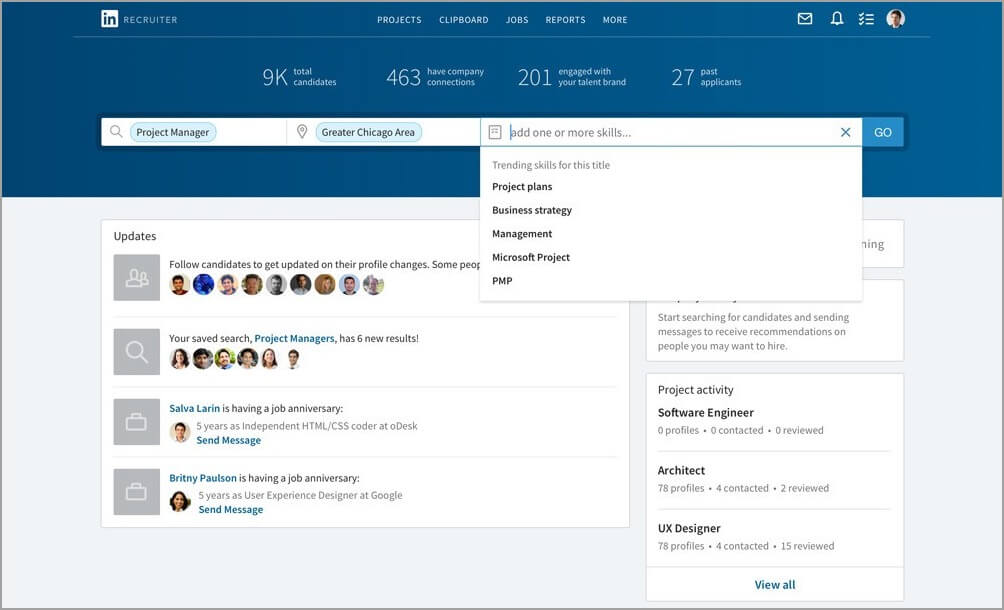
Once you’ve identified a list of candidates to contact, you can use an email finder like Clearbit Prospector or Anymail Finder to source a verified contact email.
Once you have a list of people and email addresses to contact, it’s time to write your recruiting email templates.
3. Write Your Recruiting Email Templates
Your cold email template needs to follow the steps we looked at above:
- A simple cold email subject line
- Personalization to show that you’ve done research into the individual recipient
- A clear explainer of why you’re contacting them
- A CTA to move them to the next step of the process
Rather than writing out every email recruitment template one by one, you can write it once in QuickMail and add your personalized attributes. Then, when you send your campaign, every email will be unique based on your attributes.
Attributes are values like:
- First name
- Company name
- Job title
- Location
- An opening line
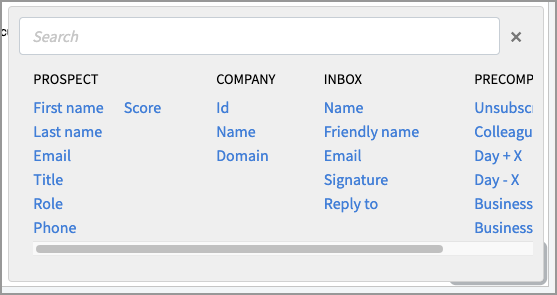
They’re unique to each recipient and taken from your candidate or potential client list spreadsheet.
When you write your recruiting email template, you can add your attributes.
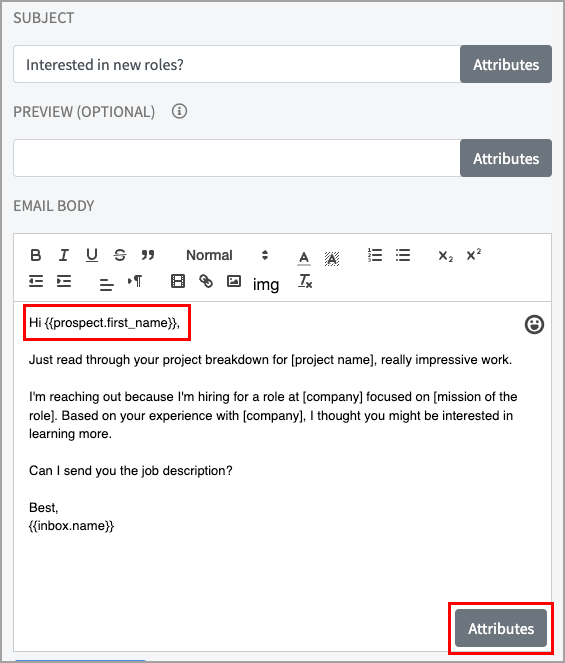
This means that every email you send is personalized, even if you’re sending hundreds out at once.
[cta title=“Better results come from better cold outreach” text=“Your team can start winning at scale in QuickMail” button=“I want a better platform” url=“https://next.quickmail.com/signup”\]
4. Add Follow Ups and Schedule Your Campaign in QuickMail
Not every candidate or potential client will reply to your first email, no matter how effectively you’ve personalized it or how relevant the opportunity is.
55% of replies to cold email campaigns come from a follow-up email.
To add a follow-up email to your recruitment email campaign in QuickMail, all you need to do is add a ‘Wait’ step after your first email.
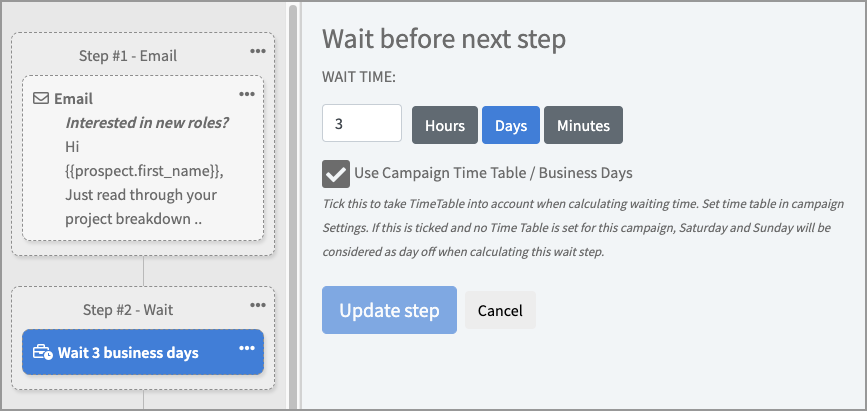
Then, add another email step.
You can repeat this as many times as you need to. In general, three to five follow-ups are enough.
In your follow-up emails, you can re-iterate why you’re reaching out and make a case for why they should reply.
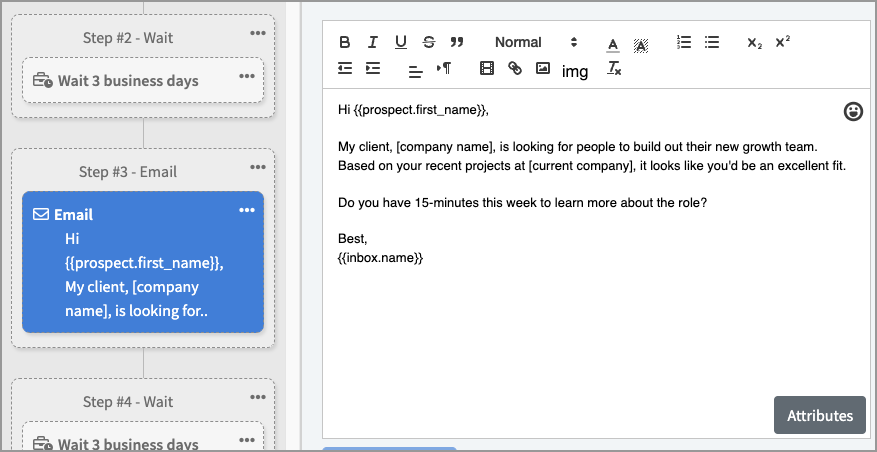
Most people don’t ignore cold emails on purpose – they’re busy and have other priorities. However, a friendly reminder can significantly impact your positive response rate, so always add at least one to your campaign.
Once you’ve added your follow-up steps and are ready to send your campaign, you can review your campaign and schedule it.
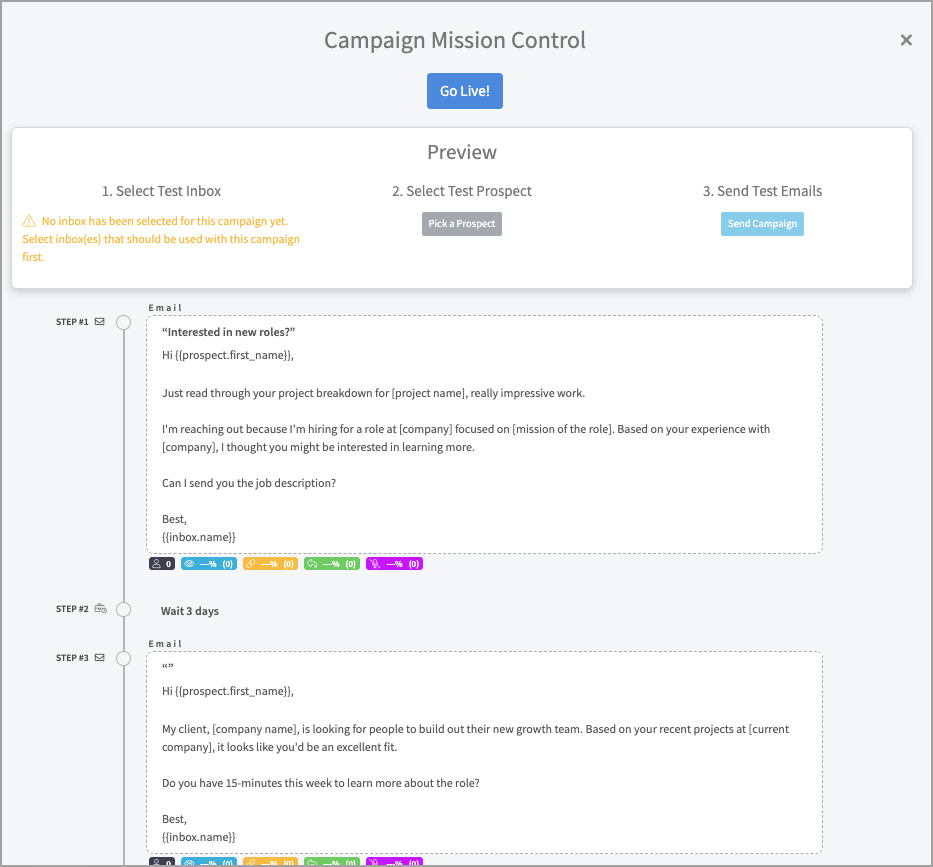
Your recruitment emails will be sent out, and all you need to do is wait for the replies to land in your inbox.
5. Track Your Results to Assess Performance
You need to track your cold email metrics to identify whether or not your recruitment cold email campaign succeeded.
QuickMail will automatically track your:
- Open rate
- Reply rate
- Click-through rate
- Bounce rate
- Unsubscribe rate
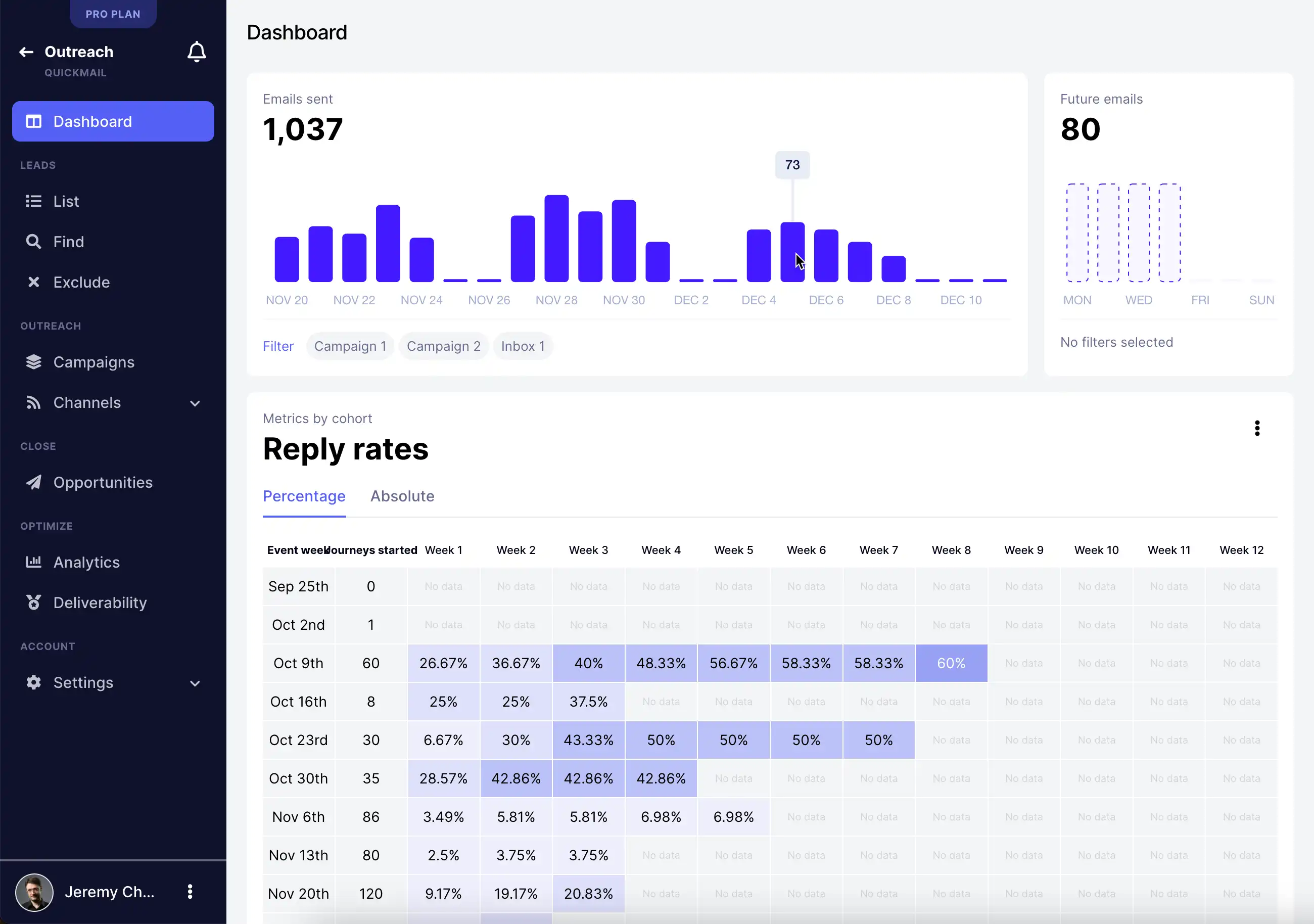
As well as that, you can run A/B tests that compare how different email variations perform against each other. You could have 50 emails with some value proposition sent to one subset of prospects, and 50 emails with an alternative value proposition sent to the other segment of your prospect list.
Over time, gathering data like this gives you accurate insights into what works, and what doesn’t.
It won’t be long before you have a predictable, scalable way to send outreach campaigns.
6. Bring Your Team and Manage Multiple Campaigns
If you’re part of a growing recruitment agency with multiple team members, you’ll need a cold email platform that can scale with you.
With QuickMail, you can bring as many people as you need onto the platform, and you only pay for new inboxes that you send emails from.
That means you can have multiple team members on the platform to help you set up and manage campaigns, at no extra cost.
When you need to increase your email-sending volume as you’re scaling, you can use QuickMail’s unique inbox rotation system to spread your email volume across inboxes, automatically.
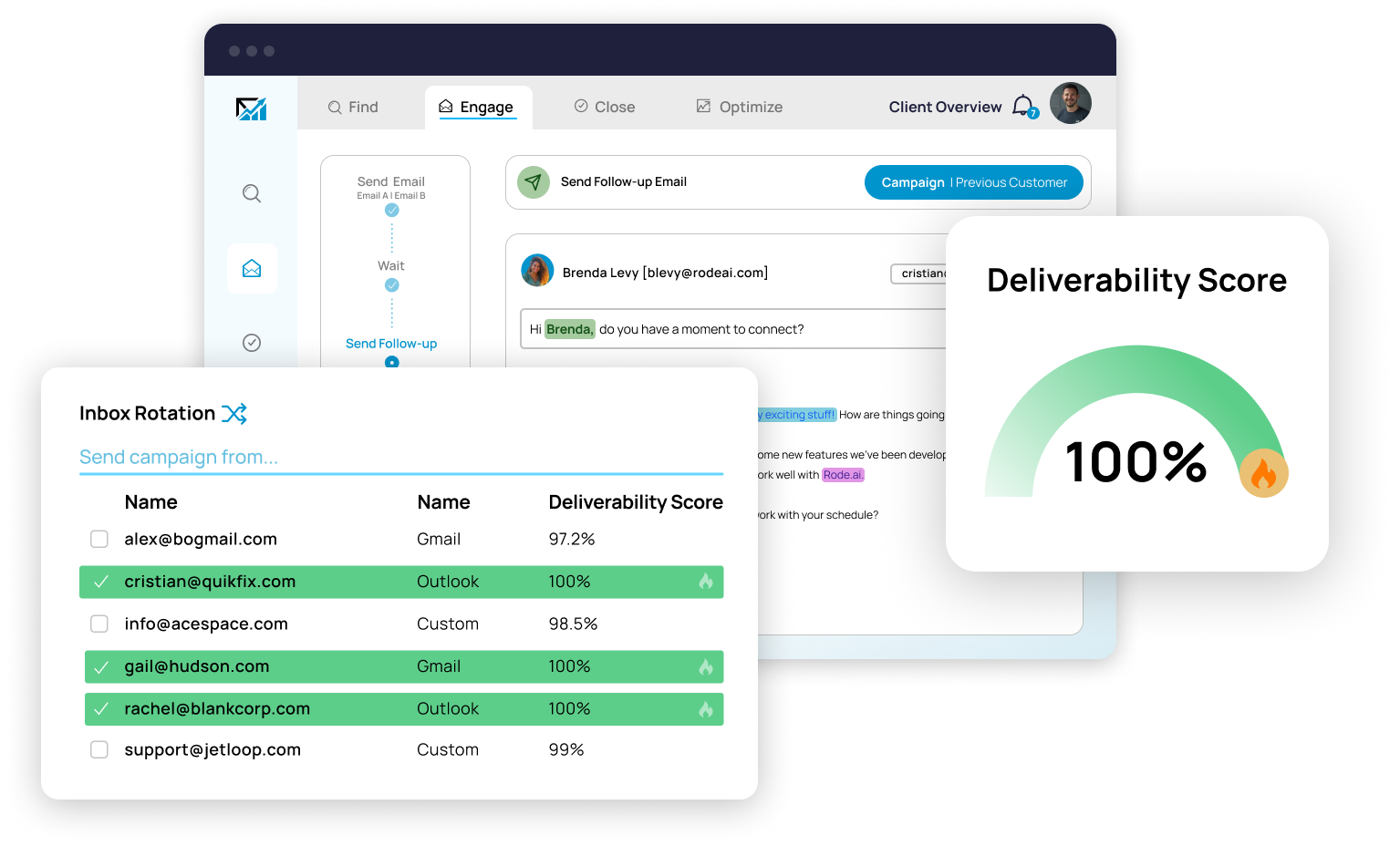
This helps ensure that none of your inboxes go over their sending limits and you have the best chance of landing in the primary inbox.
You can also split up your campaign based on the clients you’re working with. If you’re hiring for roles at three different companies, you can keep these separate.
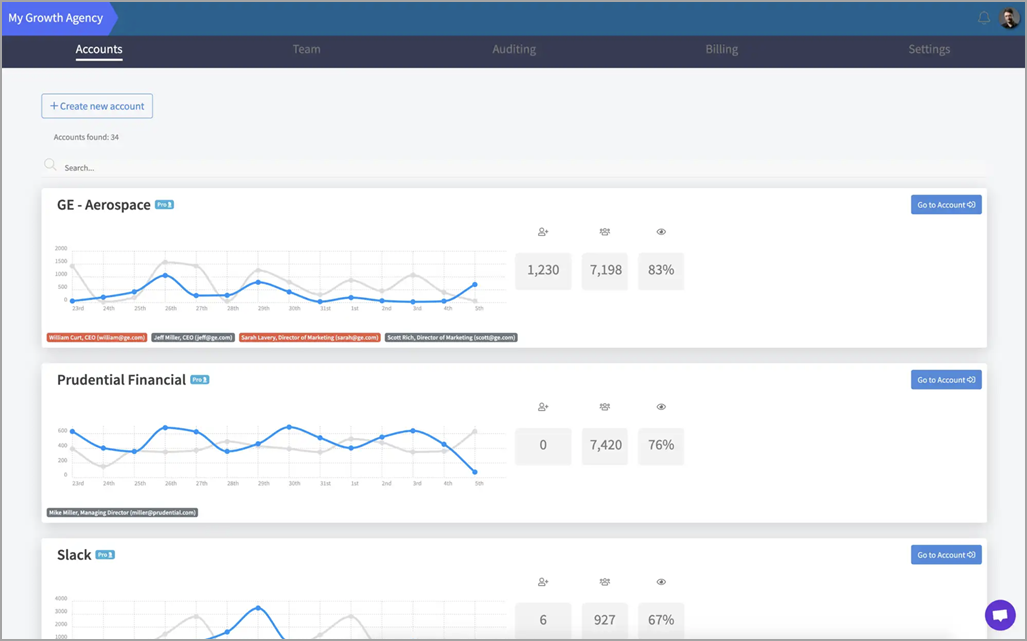
You’ll always have a clear overview of what’s going on with each one at a glance, and you still get the granularity of being able to dive into each client account and manage their email campaigns individually.
[cta title=“You deserve better results from your cold outreach” text=“QuickMail makes it simple to run high-performing outreach at scale” button=“Start my trial” url=“https://next.quickmail.com/signup”\]
Cold Email for Recruitment: A Powerful Channel
Cold email is an excellent way to generate new clients for your recruitment business and contact potential candidates for your open roles.
There are various benefits to using cold email: it’s direct, personal, and scalable.
The main challenge is getting started and building a clear process. But, if you follow the steps we’ve laid out in this guide, you’ll already have an advantage over most cold emailers and it won’t be long before you have a set of recruiting email templates that generate replies, and a system that means you can quickly scale up your cold email outreach process.
When you’re ready to launch your first campaign, you can get started with a free trial of QuickMail to see how it helps you start more conversations.