
Spam filters have a reputation for being a bad thing. In truth, spam filters are there to help you.
Spam filters will help catch low-quality cold emails, leaving room in your prospects’ inbox for high-quality, valuable cold emails to come through.
In this guide, we’ll share all of our learnings on how you can avoid the spam filter when sending cold emails to a list of cold prospects. You’ll learn tips, best practices, and actionable ways to improve the performance of your campaigns.
- What are Spam Filters?
- What are the Main Reasons for Spam Reports?
- 12 Ways to Avoid the Spam Filters When Sending Cold Emails
- How to Send Cold Emails That Land in the Inbox with QuickMail
Let’s dive in.
What are Spam Filters?
Spam filters are put in place by Email Service Providers (ESPs) to stop their customers and users from receiving unsolicited and low-quality emails.
We’ve all checked our spam folder and seen it full of emails trying to trick us into clicking a dangerous link or asking to send money to someone you’ve never heard of.
Without spam filters, those would make it to your main inbox, ruining the email experience for everyone.
As a cold emailer, you should be thinking of spam filters as a positive thing. When your prospects do receive an email that lands in their main inbox, they won’t automatically associate it with spam.
What are the Main Reasons for Spam Reports?
Most spam reports come due to three main reasons.
- Email Content: you’re emailing someone low-quality content they’re not interested in.
- Email List: Your prospects aren’t a good fit for your product/service/offer.
- B2C: If you’re emailing a B2C audience, you won’t get results. It also goes against regulations like CAN-SPAM.
That said, there are a range of other factors that can make a difference into whether or not you get caught by spam filters.
12 Ways to Avoid the Spam Filters When Sending Cold Emails
1. Add Your SPF and DKIM Records
Your SPF and DKIM records need to be in place. If they’re not, spam filters won’t trust your email as there’s a chance they’re being spoofed and not coming from you.
Setting these records up doesn’t require much technical knowledge, and all you need to do is follow the steps laid out by your ESP.
- Setting up your SPF and DKIM on Gmail
- Setting up your SPF and DKIM on Outlook
Most spammers don’t take the time to properly set up their email accounts before blasting thousands of unsuspecting recipients with their spam emails. By taking this simple step to configure your account, you’ll improve your deliverability and reduce the chances of being caught in the spam filters.
If you’re unsure whether your SPF and DKIM records are in place, you can use a tool like Check MX or GlockApps.
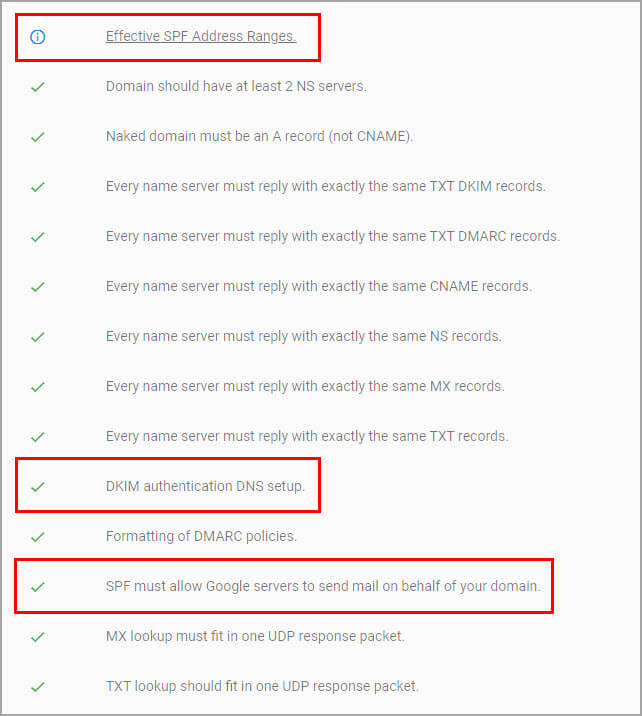
Run your email address and domain through them and they’ll tell you if you’re all set. If there are any problems, the software will tell you what’s wrong.
2. Keep Your Sending Volume Low
Sending volume is one of the most important factors when it comes to whether or not your cold emails are caught by spam filters.
In the past, cold emailers could get results by sending hundreds of emails per day and relying on volume. Today, you need to refine the approach.
Sending hundreds of emails per day from one email address is a surefire way to ruin your sender reputation and ensure ESPs always send your emails to spam.
Keeping your sending volume lower and spending more time personalizing each email will help you avoid the spam filters and help you get more replies.
3. Warm Up Your Cold Email Inbox
Spam filters are designed to spot unusual email activity. If you have days where you send no cold emails, and other days where you send hundreds, spam filters will be more likely to stop your emails from landing in your prospects’ inboxes.
To avoid this happening to your campaigns, you need to warm up your inbox before using it for your outreach.
By warming up your inbox you’ll show ESPs that you’re regularly sending emails and receiving engagement on them. When you send a new campaign with a higher volume, it won’t look out of place.
Don’t worry — you don’t have to warm up your inbox manually. There are a range of free and paid email warming tools available, including MailFlow's free email warmup tool, which has a native integration with QuickMail.
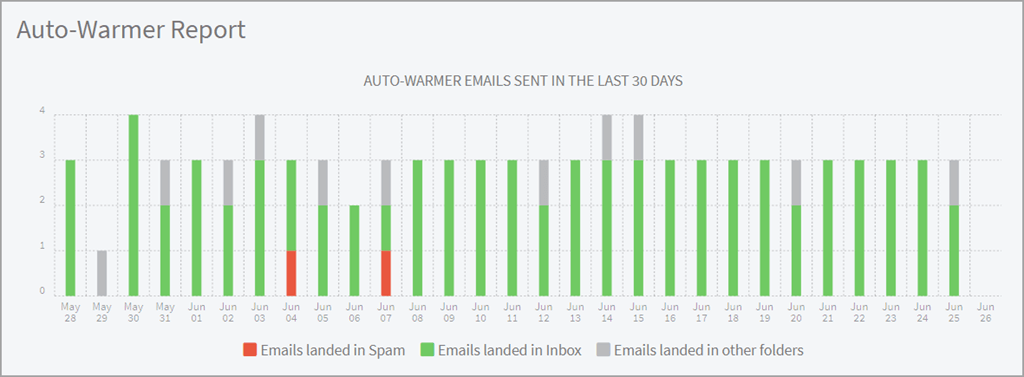
You can run the MailFlow Auto Warmer on your email address for 2-4 weeks, and when you see that your emails are mainly landing in the primary inbox, you know you’re safe to start sending cold emails.
4. Create a Focused and Relevant Prospect List
A badly chosen prospect list is one of the main reasons spam filters stop your emails from going through.
When you’re prospecting, always ask yourself:
- Will these prospects have a legitimate interest in what you have to say?
- Have you done enough research to write a personalized email for each prospect?
- Can you help them solve a real problem in their business?
Asking these three questions will help you determine if you’re emailing the right people and have a narrow enough focus for your cold email campaign.
An added benefit to narrowing down your prospect list is that it’ll lower the number of prospects in your campaign, giving you more time to spend on personalizing each email.
Your prospects will be more likely to reply as they can see you’ve actively researched them, and, ESPs will be less likely to flag your emails as spam as your sending volume is low and every email in your campaign is unique.
5. Verify Emails Before Sending to Them
If ESPs and spam filters notice that a high proportion of your emails are bouncing, the problem will compound and you’ll be more likely to be caught in the spam filters in the future.
To avoid email bounces, use a tool like NeverBounce or ZeroBounce to verify your prospects’ emails before you reach out to them.
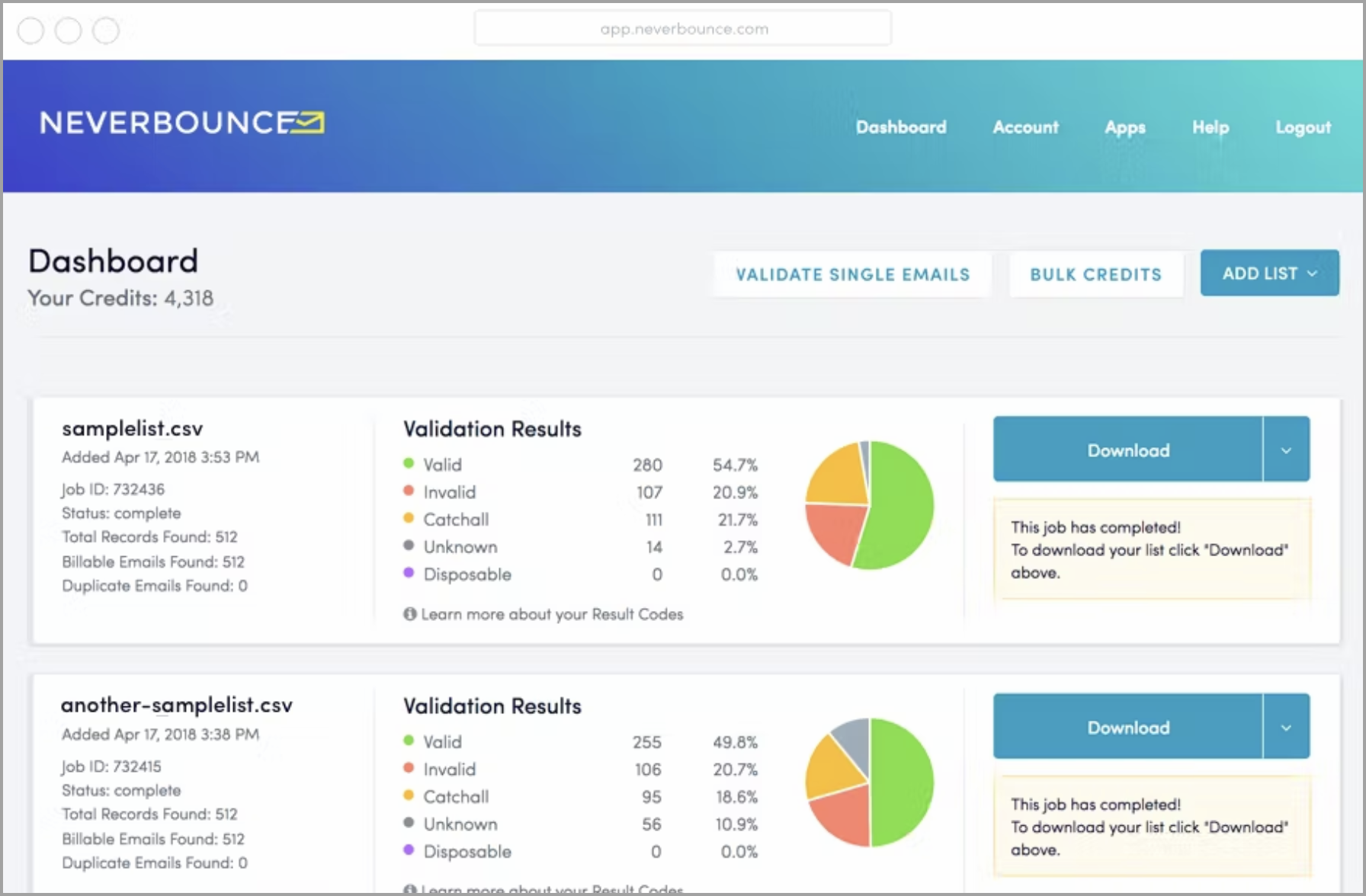
*Image source: *GetApp
You can also run this process automatically inside QuickMail.
All you have to do is connect your NeverBounce or ZeroBounce account (or your email verification tool of choice) with your QuickMail account.
Then, you can verify your email addresses directly within QuickMail. If an email isn’t valid, you can ensure you never send emails to non-existent addresses.
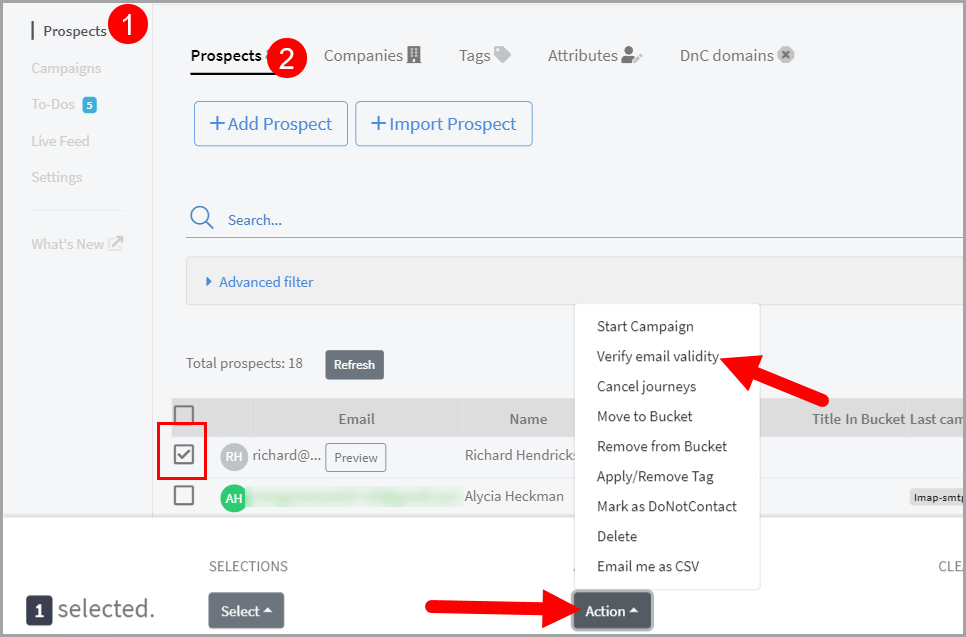
This is particularly important if you’re sourcing your prospect lists from email finders relying on large databases as the emails in these databases can be outdated as people change jobs or move companies.
If you get a few bounces in every campaign, don’t worry too much. Our data shows that even the best cold email campaigns have a small percentage of bounces.
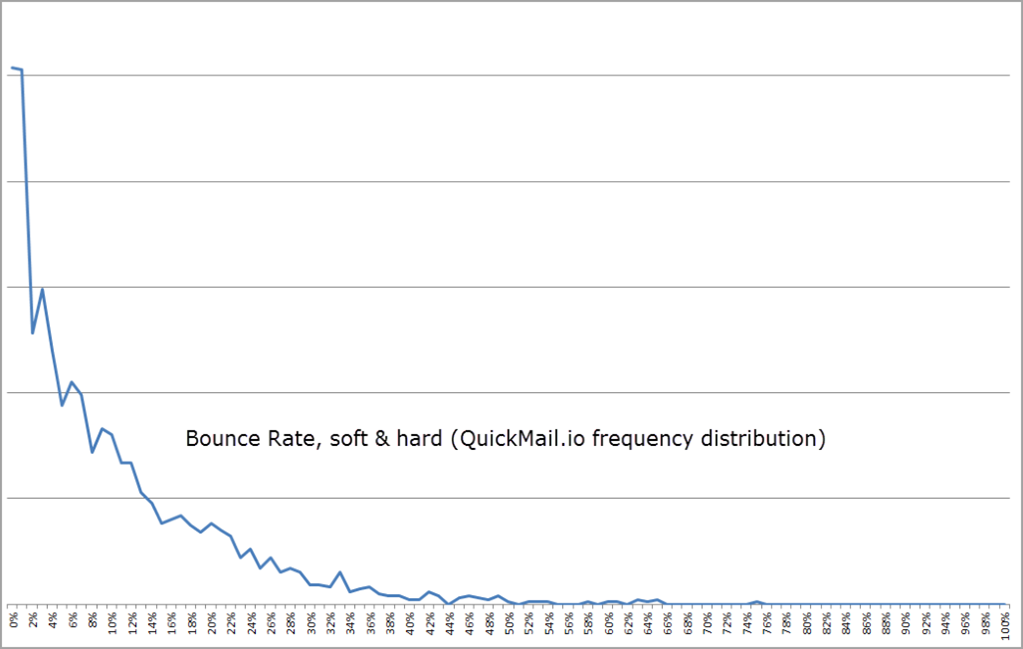
As long as you verify your emails and keep your bounces below 2-5% per campaign, you won’t need to worry about it.
6. Personalize Every Email You Send
If you blast the same email template to 1,000 recipients, spam filters set up by ESPs will instantly see that you don’t care about your recipients.
Your emails will be lucky if they make it into your prospects’ inboxes.
In every cold email campaign you send, each email needs to be uniquely personalized for every recipient.
That means using:
- Their names
- Company names
- Mentioning relevant details that prove you’ve researched them
For example, a common but powerful way to improve your email relevance is to write a completely personalized opening line in every email.
Rather than jumping straight into your sales pitch, you’ll open the email by mentioning something unique to the prospect. For example, mentioning that you heard them on a podcast or saw their company featured in the local news.
There are two key benefits to this:
- Spam filters are less likely to flag a unique email as spam
- Your recipients will be more likely to reply to an email clearly personalized for them
To make personalization easy, even at scale, use attributes in QuickMail.
This process starts as you prepare your prospect list. For every prospect, make sure you have all the details you’ll want to mention in your email, for example, first name, company, job title, or the custom opening line.
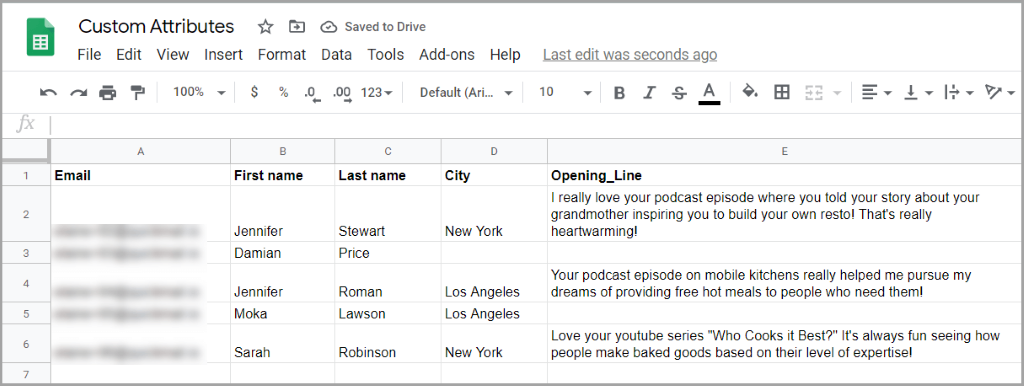
As you write your email templates, head to the attributes button in the email editor and include any you’d like.
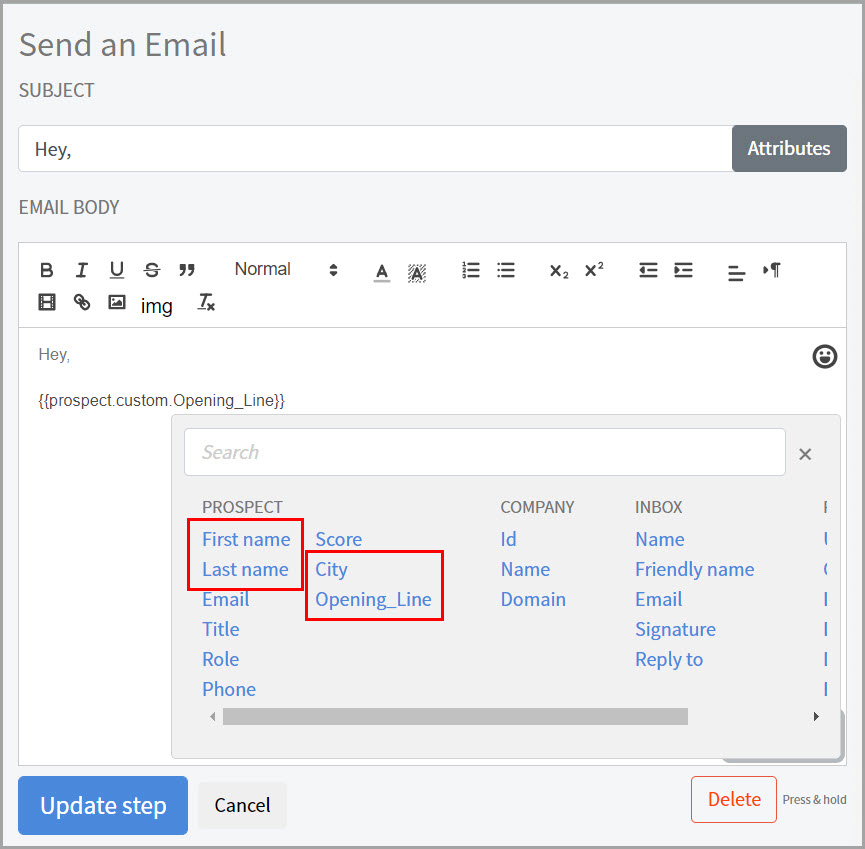
When the email is sent to your prospect, the attributes like {{prospect.custom.Opening_Line}} will be automatically filled with the information from your prospect list.
“Hey,
Love your YouTube series ‘Who Cooks It Best?’. It’s always fun seeing how people make baked goods based on their level of expertise.“
Your personalization doesn’t need to be too detailed — as long as you prove you’ve done your research, that’s going to be enough to trust you more than they would if you’d sent them a boring, impersonal sales pitch.
7. Keep Your Emails Plain-Text
Spam filters aren’t designed to stop people from sending emails to each other. When you’re doing your outreach, keep that in mind.
Consider what you’d do if you were emailing a colleague:
- Would you include images? No.
- Would you include links to your landing page or demo booking page? No.
- Would you use overly sales-y language? No.
Always talk like a real person and you’ll be less likely to be caught in the spam filters, as ESPs will trust your email content enough to let your message through.
There are no set rules to what you can and can’t include. For example, there are situations where it can make sense to include an image or add a link to let your prospect schedule an appointment with you.
But, don’t overdo it and always make sure your emails look natural.
8. Don’t Use Tracking Links or Open Tracking Pixels
Most good cold email tools let you track your cold email metrics like:
- Open rate
- Click-through rate
- Reply rate
- Unsubscribe rate
Some of these, like reply rate, are completely fine to track. After all, it’s simply the number of people replying compared to the number of people in your campaign.
However, metrics like open rate and click-through rate rely on tracking links and tracking pixels that are inserted into your cold emails when they’re sent.
While these invisible tracking pixels and links aren’t noticeable to your prospects, they are seen by ESPs scanning the contents of your emails as they arrive in your prospects’ inboxes.
If your email contains links or hidden tracking pixels, it’s no surprise that spam filters will be more likely to stop your email from going through.
In truth, you won’t be missing out on useful data either. After all, getting hundreds of opens doesn’t matter if you don’t get replies. As long as your reply rates stay high, you know your emails are doing their job effectively.
9. Use Outlook Over Gmail
Your ESP of choice can also affect whether or not your emails will get caught in the spam filter.
For example, our data shows that Outlook has slightly higher deliverability rates than Gmail, even for Gmail users emailing other Gmail users.
We’ve also seen more lead generation agencies migrating from Gmail to Outlook due to it having better deliverability rates, leading to around 5-10% improvements in open rates.
The only problem we’ve seen is that Outlook’s setup can be tricky, and getting support if you have problems is difficult. But, once you’re set up most cold emailers won’t encounter any serious issues.
While your ESP will only play a small role in whether or not your emails get flagged as spam, it’s still a consideration.
10. Leave Out The Attachments
No matter how good your sales deck is, your prospects don’t want to see it in your first outreach email.
On top of that, spam filters are going to treat your emails with more suspicion if you include attachments in emails to cold prospects.
To reduce your chances of being flagged as spam, leave out attachments until the person you’re reaching out to asks for more information.
Use your first email to start a conversation and build a positive relationship with your prospect. You’ll get more replies and better results from your outreach.
11. Leave Out Risky Content
Spam filters look at the text and contents of your emails. If you’re using words and phrases similar to those that spammers use, you’re going to get caught in the spam filter.
There’s no exhaustive list of words and phrases that will get your emails flagged, but, always read your email copy critically to make sure it’s free of words that spammers would use, like “free”, “great offer”, or any type of keyword that’s clearly taboo and doesn’t fit in an email to a stranger.
The type of keywords that ESPs look for is always evolving, so don’t rely on any single list. There may also be times you need to include keywords that are typically seen as spammy, but in a different context, they’ll be completely fine to use.
12. Run Regular Deliverability Audits to Check Your Sender Reputation
Every cold emailer needs to be aware of how deliverability affects their performance and results.
While running these checks won’t help you avoid the spam filter in the first place, they will help you understand if ESPs are treating your emails as spam.
Your prospects won’t tell you that your emails land in their spam folder, so you’ll need to use QuickMail’s deliverability reports to find out.
Every week, your inbox will be tested in our inboxes.

If you see that any of the major inbox providers are sending your emails to spam, you’ll know it’s time to make updates to your campaigns or hit pause until the problem is solved.
How to Send Cold Emails That Land in the Inbox with QuickMail
Avoiding the spam filter and having your emails inboxed is one of the biggest challenges when it comes to cold emailing at scale.
Here’s how QuickMail can help.
1. Warming Up Your Inboxes
MailFlow can help you warm up your email account within a few short weeks, and it has a native integration with QuickMail.
It’ll generate positive engagement for your email address, showing ESPs you’re a trustworthy sender.
When you’re ready to start sending your campaigns, your email address will already be warmed up and the spam filter won’t need to be a concern.
2. Inbox Rotation for Larger Teams
As your team scales and you start working with more and more clients, your agency will need to start sending emails from multiple inboxes.
This will spread your sending volume out, making each campaign less likely to be flagged as spam by ESPs.
On top of that, it’s going to help with managing your email workload as different team members can be in charge of different inboxes and clients.
In most cold email tools, adding new inboxes results in lots of cloning campaigns, copy-pasting email sequences, and having to make manual edits to campaigns to make sure everything is identical.
In QuickMail, we built inbox rotation as a core feature: to spread your sending volume between inboxes, all you need to do is add your inbox.
You can choose which inboxes to include in a campaign, and the emails will be automatically spread between the inboxes.
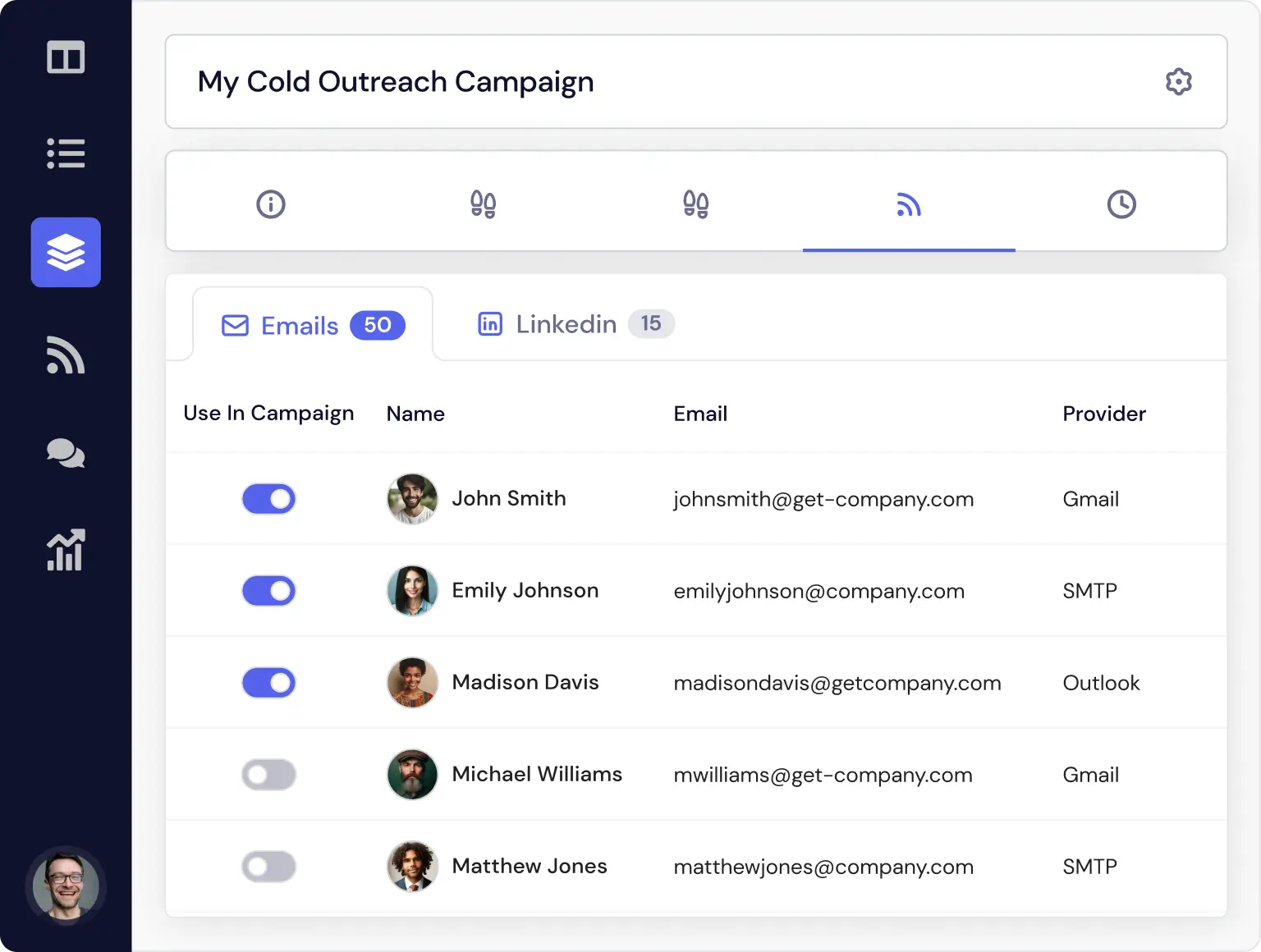
If any one of your inboxes has issues with spam reports, you can pause that inbox and keep sending your cold emails from another inbox.
3. Using Human-Like Sending Schedules
Humans can’t send hundreds of emails out within minutes of each other. To show you’re a real person, you can use QuickMail’s sending schedules to manage your sending times, volume, and delay between each email.
For example, you can create a sending timetable to ensure emails can only be sent from your account on Tuesdays - Sundays from 9 AM - 5 PM. You could restrict that further, or change your schedule on a day-by-day basis to reflect how a real person uses their inbox.
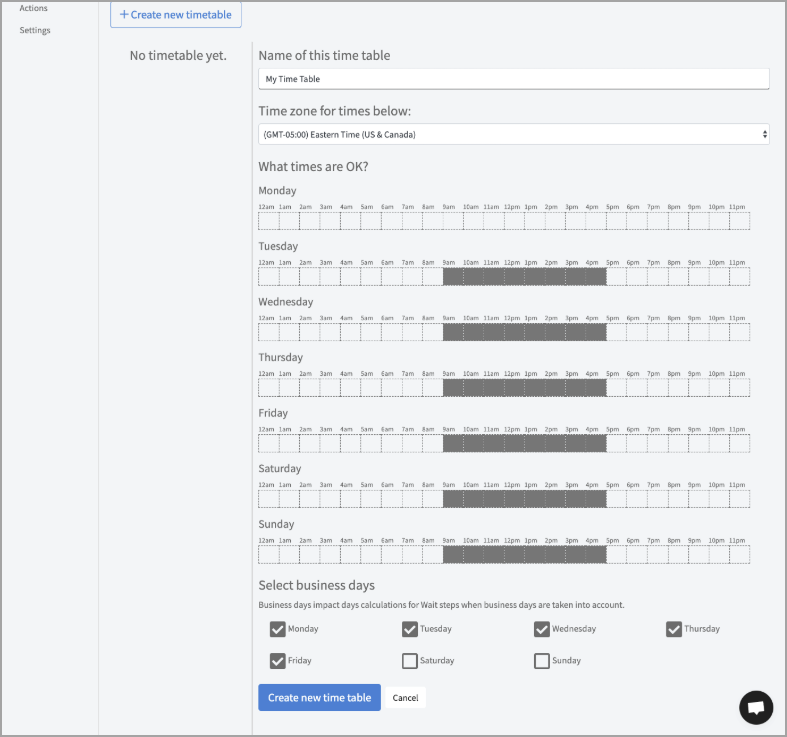
On top of sending schedules, there’s also a minimum time delay between sending emails.
By default, it’s 30 seconds, but you can increase that by as much as you like or add a random time variation between each one. If you’re only sending a low volume of emails, you could space them out by several minutes to drastically reduce the chances of your campaigns getting flagged as spam.

While adjusting your sending schedule alone won’t be the reason your campaigns do or don’t get flagged as spam, it’s going to further improve your chances of your emails landing in your prospect’s primary inbox.
Wrapping Up
There’s no single way to ensure your cold emails don’t get caught in the spam filter.
Even the best cold email campaigns are going to end up with some emails landing in the spam folder.
But, following these steps is an excellent way to start reducing that number in your campaigns.
From warming up your inbox, to avoiding spam trigger words, to ensuring you personalize every email in your campaign, each tip will reduce the chances that spam filters set up by ESPs will decide to stop your email from reaching the recipient.
Ensuring you’re following each one won’t take long, and if it reduces the number of emails landing in spam and improves your overall reply rates, it’s going to be worth it.
When you’re ready to start having more conversations with prospects using cold email, you can try out QuickMail with a free trial.