Deliverability for agencies
We Take Care of Your Deliverability
If you run cold email for clients, you're in the right place. QuickMail warms up their inboxes, spreads the sending, and swaps out weak senders before they hurt a campaign. Your team stays on lists, copy and bookings.
14-day free trial.
Deliverability is hard. Keeping up with it is our job.
Google keeps getting better at spotting spam. Microsoft sends a large share of cold email straight to junk.
Both now expect SPF, DKIM and DMARC on every sending domain. The rules keep changing, and what worked last quarter may not work today.
Keeping up has become a full-time job. Some agencies hire a deliverability expert just for this.
That's what we're here for. QuickMail checks every sender's health each day, and our team keeps track of what Google and Microsoft change, so your team can focus on getting clients booked.
Why it matters
Your clients pay for bookings. Bookings need inboxes that work.
When a client sells to a small market, every lead counts. A burned domain can cost them leads you may never get back.
A day of downtime is a day without bookings. Two weeks of re-warming new domains is two weeks of retainer with little to show.
QuickMail runs warm-up, Inbox rotation™, Stealth Mode™ and Deliverability AI right next to your campaigns.
Automated warm-up
Inboxes warm up before the first campaign, and stay warm after.
Warm-up starts before a client's first send and keeps running in the background while campaigns go out.
- Inboxes bought through QuickMail. They get the premium Auto-Warmer.
- Inboxes you bring. They use Mailflow warm-up.
Plan about 3 to 4 weeks of warm-up for new domains before a client launch.
Explore email warm-up
Inbox rotation™
Spread each client's sending across several inboxes.
One campaign can send from several inboxes. No single inbox carries the whole load, so one weak sender doesn't stop the campaign.
- Several senders per campaign. Add as many inboxes as the client's volume needs.
- Daily limits per inbox. You set how much each inbox sends.
- Mixed providers. Connect Google, Microsoft and custom SMTP inboxes to spread the risk.

Stealth Mode™
Each inbox sends on its own, not as part of a crowd.
Every Google inbox bought through QuickMail sends through its own Gmail API connection. There's no shared QuickMail sending app tying your clients' inboxes together.
Stealth Mode™ turns on automatically for those inboxes. You still control content and tracking.
Explore deliverability features
Deliverability AI
A weak sender goes out. A warm one takes its place.
Deliverability AI checks every inbox's performance each day. When an inbox slips, it goes into recovery and a warmed inbox from the same smart sending group takes over. The client's campaign keeps sending.
You set the score threshold and how long recovery lasts.
Your account managers don't need to check every inbox by hand to find the one that's slipping.
Tip: Keep a few spare warmed inboxes in each client's group, so there's always one ready.
Meet Deliverability AI
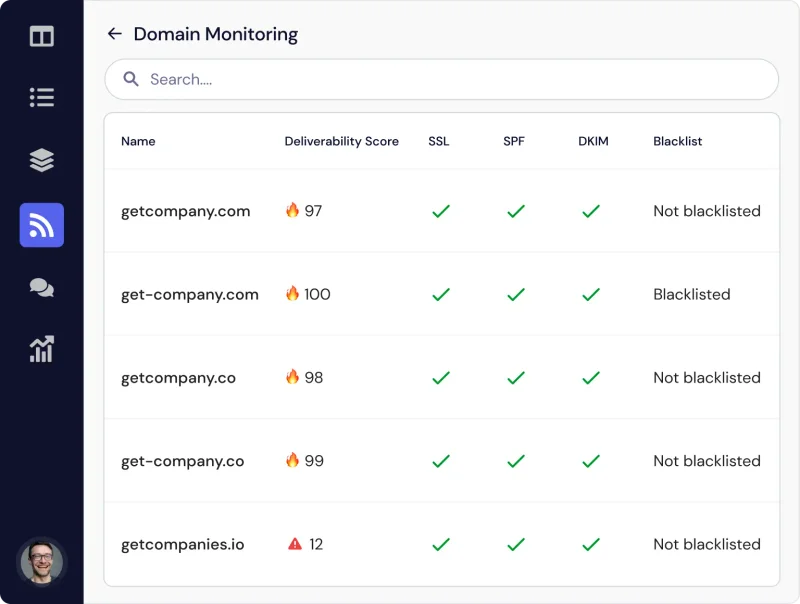
Domain health monitoring
See which client domains need attention.
Check SPF, DKIM, blacklist status and deliverability scores for every sender. Use it before a launch and before a client review.
- Authentication. SPF and DKIM checks.
- Reputation. Blacklist monitoring.
- Performance. A deliverability score for each inbox.
Why agencies choose QuickMail
"I got great insights into whether my emails were actually reaching inboxes or landing in spam."

A few things to know
Your clients' inboxes. Your questions.
Get to know the tools behind your sending routine.
Can I bring my clients' existing inboxes?
Yes. Connect their Google, Microsoft or SMTP inboxes. Inboxes bought through QuickMail get the Auto-Warmer. Inboxes you bring use Mailflow warm-up.
Can I keep each client separate?
Yes. Each client gets its own workspace with its own inboxes and campaigns.
Does warm-up keep running during campaigns?
Yes. Keep daily limits sensible and check scores regularly.
How does Deliverability AI replace a sender?
It reviews every inbox daily. When one slips, it swaps in a warmed inbox from the same smart sending group. This only works if the group has a spare, so keep one or two ready.
Does Stealth Mode™ apply to every inbox?
No. It applies to Google inboxes bought through QuickMail. It doesn't change your content or volume choices.
Will this guarantee every email reaches the inbox?
No. Mailbox providers decide where emails land. List quality, authentication, content and sending habits matter too. If a client's domain was burned before they came to you, it may take time to recover. Start warming new domains while the old ones rest.